1 Universal eSIM™
Umi eSIM Installation
and Usage
Umi eSIM Installation
and Usage
Install once, use everywhere. Get online in under 60 seconds with our step by step installation guide.
Install once, use everywhere. Get online in under 60 seconds with our step by step installation guide.
Pay-as-you-go from $2.55/GB. Your balance never expires.
Pay-as-you-go from $2.55/GB. Your balance never expires.
" height="15.96587083656648px" id="gUt8q3MIs" width="13.557999603271485px"/></svg>)

♥️ Loved by pilots & crew · No contracts · No speed caps
♥️ Loved by pilots & crew · No contracts · No speed caps

900+ Mbps
Top recorded speed
5,000+
Happy travelers
4.9/5
App Store rating
Under 60s
Setup time
900+ Mbps
Top recorded speed
5,000+
Happy travelers
4.9/5
App Store rating
Under 60s
Setup time
900+ Mbps
Top recorded speed
5,000+
Happy travelers
4.9/5
App Store rating
Under 60s
Setup time
Install your Umi eSIM (Fast)
Install your Umi eSIM (Fast)
One tap in the Umi app — you're online in under 60 seconds.
One tap in the Umi app — you're online in under 60 seconds.
→ Top up Flow and link data plans before you travel.
→ Top up Flow and link data plans before you travel.
→ Linked plans activate on arrival — always used before Flow.
→ Linked plans activate on arrival — always used before Flow.
→ Label your eSIM in phone settings so it's easy to find.
→ Label your eSIM in phone settings so it's easy to find.
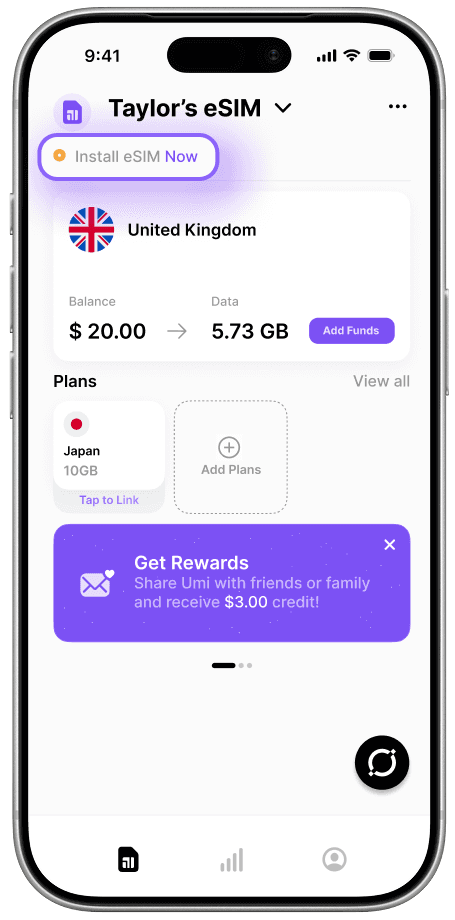
Step 1
Go to your Umi app
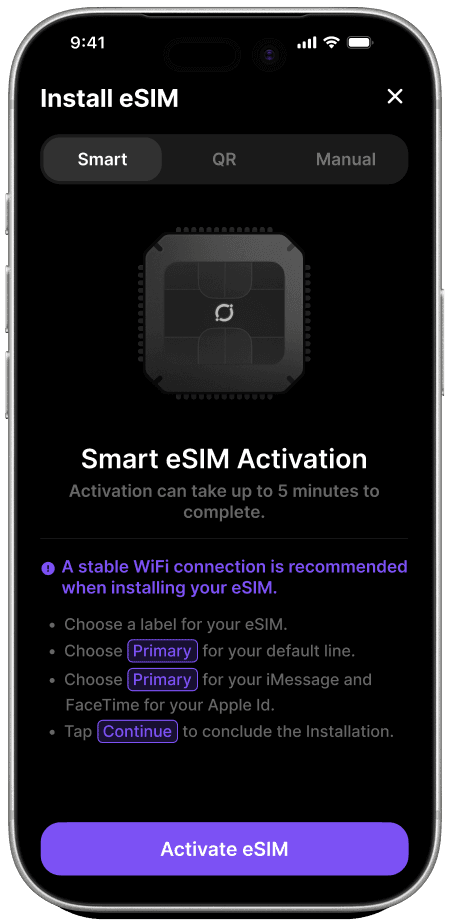
Step 2
Tap Activate eSIM
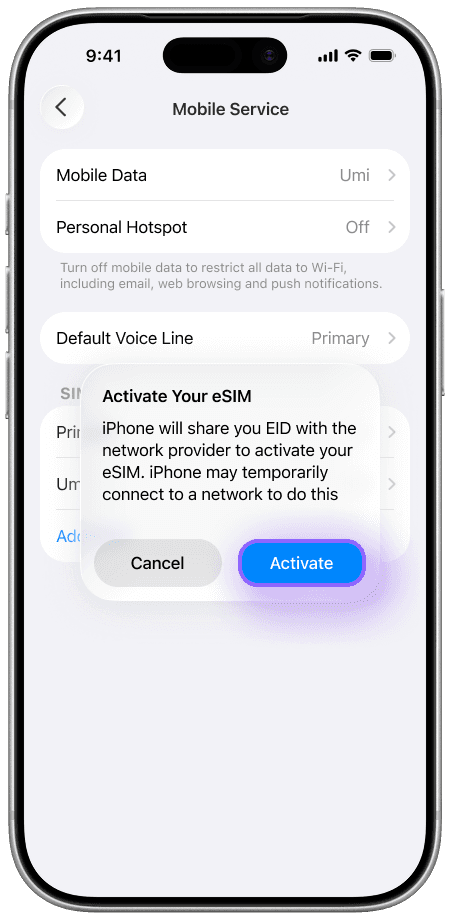
Step 3
Tap Activate
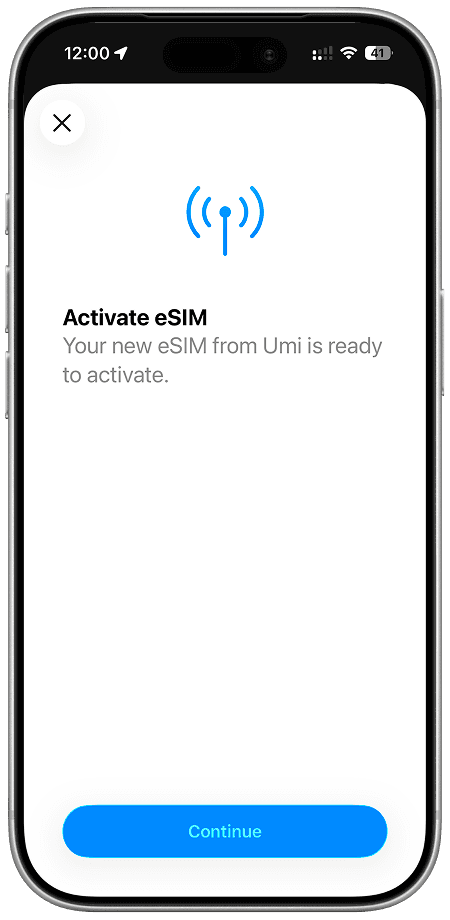
Step 4
Tap Continue
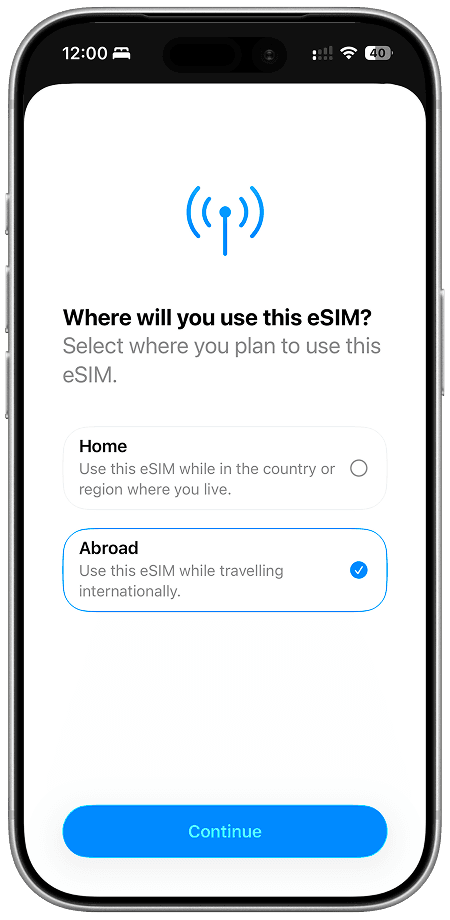
Step 5
Select Abroad
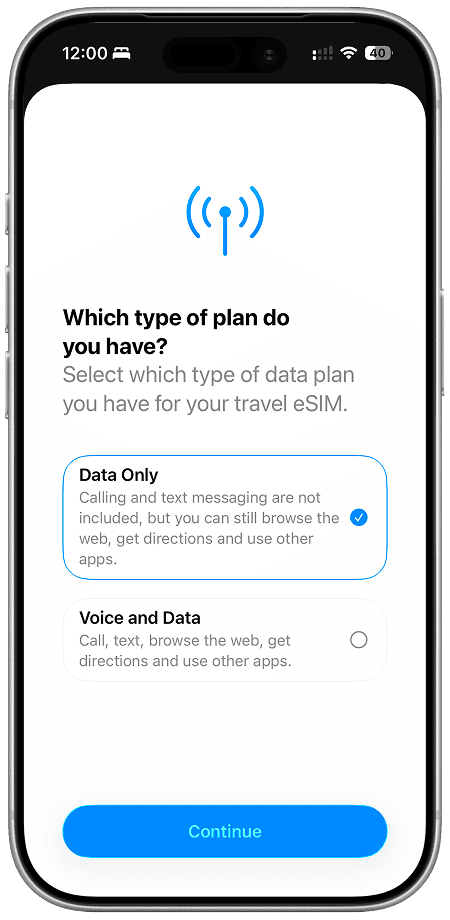
Step 6
Select Data Only
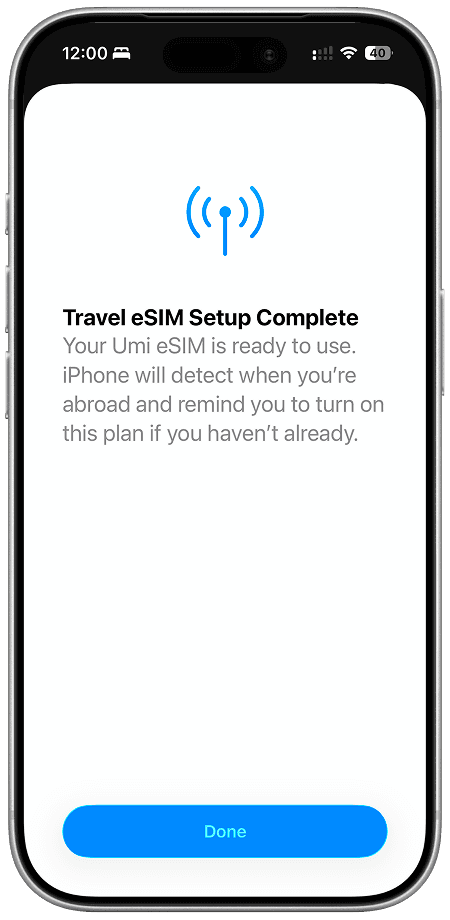
Step 7
Tap Done (not done yet)
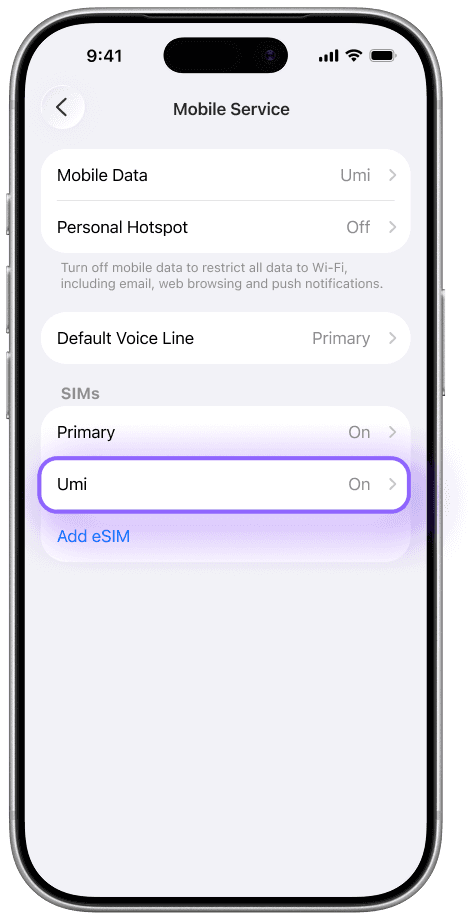
Step 8
Select your Umi eSIM
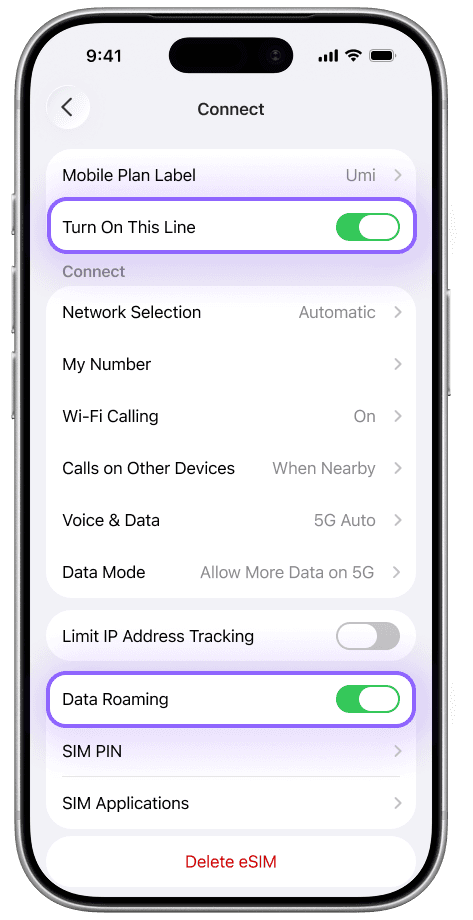
Step 10
Turn on This Line and Data Roaming
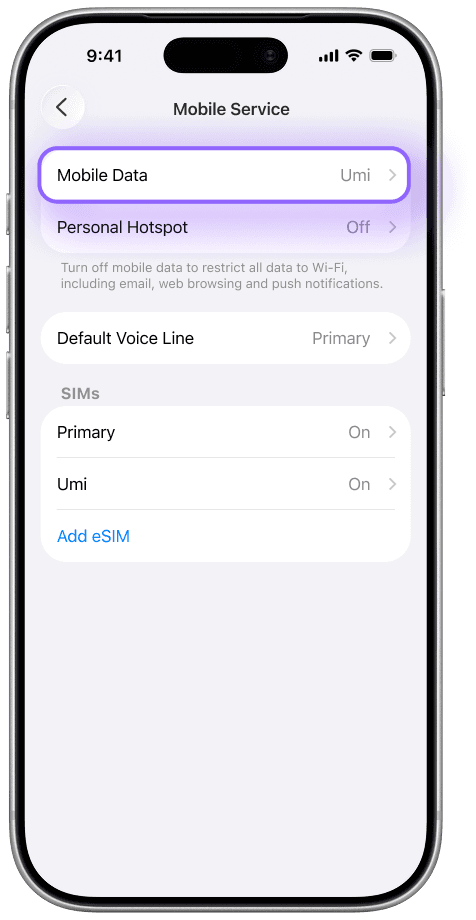
Step 11
Go to Mobile Data
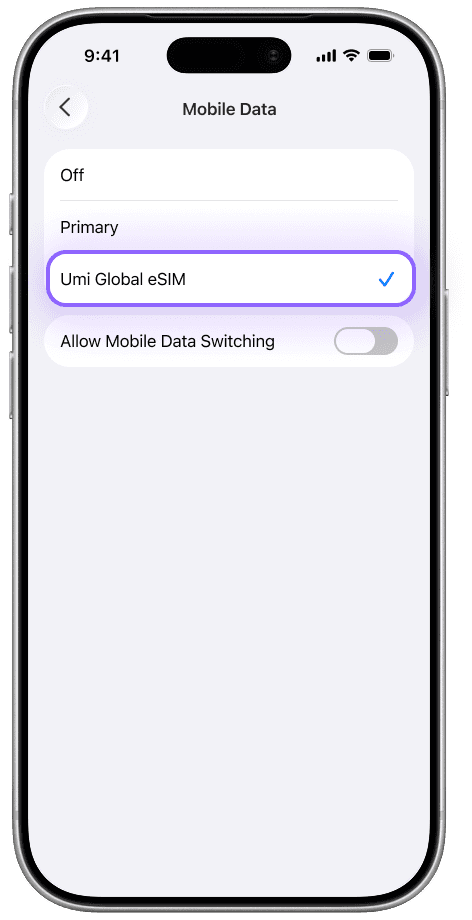
Step 12
Select your Umi eSIM
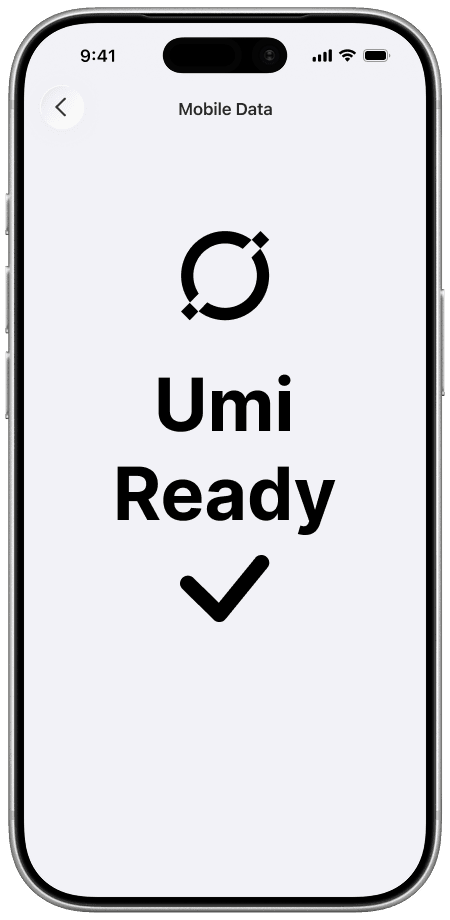
All Done
You're good to go!
Step 1
Go to your Umi app
Step 2
Tap Activate eSIM
Step 3
Tap Activate
Step 4
Tap Continue
Step 5
Select Abroad
Step 6
Select Data Only
Step 7
Tap Done (not done yet)
Step 8
Select your Umi eSIM
Step 10
Turn on This Line and Data Roaming
Step 11
Go to Mobile Data
Step 12
Select your Umi eSIM
All Done
You're good to go!
Step 1
Go to your Umi app
Step 2
Tap Activate eSIM
Step 3
Tap Activate
Step 4
Tap Continue
Step 5
Select Abroad
Step 6
Select Data Only
Step 7
Tap Done (not done yet)
Step 8
Select your Umi eSIM
Step 10
Turn on This Line and Data Roaming
Step 11
Go to Mobile Data
Step 12
Select your Umi eSIM
All Done
You're good to go!
Step 1
Go to your Umi app
Step 2
Tap Activate eSIM
Step 3
Tap Activate
Step 4
Tap Continue
Step 5
Select Abroad
Step 6
Select Data Only
Step 7
Tap Done (not done yet)
Step 8
Select your Umi eSIM
Step 10
Turn on This Line and Data Roaming
Step 11
Go to Mobile Data
Step 12
Select your Umi eSIM
All Done
You're good to go!
Step 1
Go to your Umi app
Step 2
Tap Activate eSIM
Step 3
Tap Activate
Step 4
Tap Continue
Step 5
Select Abroad
Step 6
Select Data Only
Step 7
Tap Done (not done yet)
Step 8
Select your Umi eSIM
Step 10
Turn on This Line and Data Roaming
Step 11
Go to Mobile Data
Step 12
Select your Umi eSIM
All Done
You're good to go!
Step 1
Go to your Umi app
Step 2
Tap Activate eSIM
Step 3
Tap Activate
Step 4
Tap Continue
Step 5
Select Abroad
Step 6
Select Data Only
Step 7
Tap Done (not done yet)
Step 8
Select your Umi eSIM
Step 10
Turn on This Line and Data Roaming
Step 11
Go to Mobile Data
Step 12
Select your Umi eSIM
All Done
You're good to go!
Step 1
Go to your Umi app
Step 2
Tap Activate eSIM
Step 3
Tap Activate
Step 4
Tap Continue
Step 5
Select Abroad
Step 6
Select Data Only
Step 7
Tap Done (not done yet)
Step 8
Select your Umi eSIM
Step 10
Turn on This Line and Data Roaming
Step 11
Go to Mobile Data
Step 12
Select your Umi eSIM
All Done
You're good to go!
Step 1
Go to your Umi app
Step 2
Tap Activate eSIM
Step 3
Tap Activate
Step 4
Tap Continue
Step 5
Select Abroad
Step 6
Select Data Only
Step 7
Tap Done (not done yet)
Step 8
Select your Umi eSIM
Step 10
Turn on This Line and Data Roaming
Step 11
Go to Mobile Data
Step 12
Select your Umi eSIM
All Done
You're good to go!
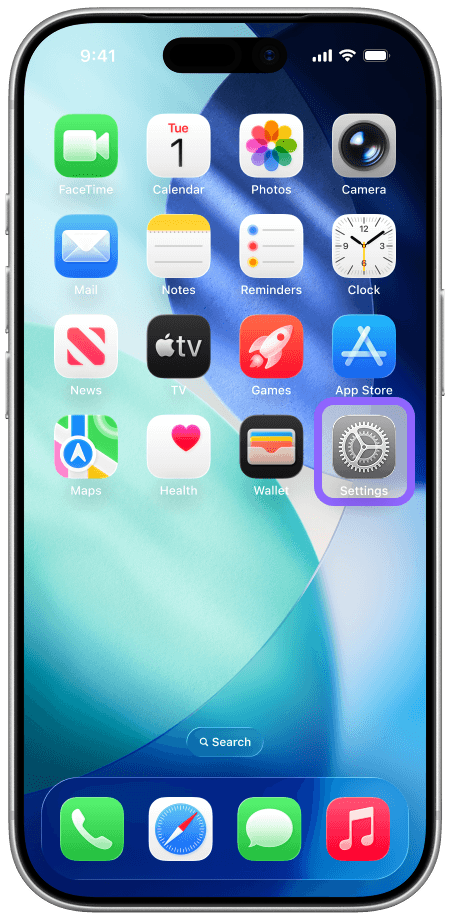
Step 1
Go to Settings
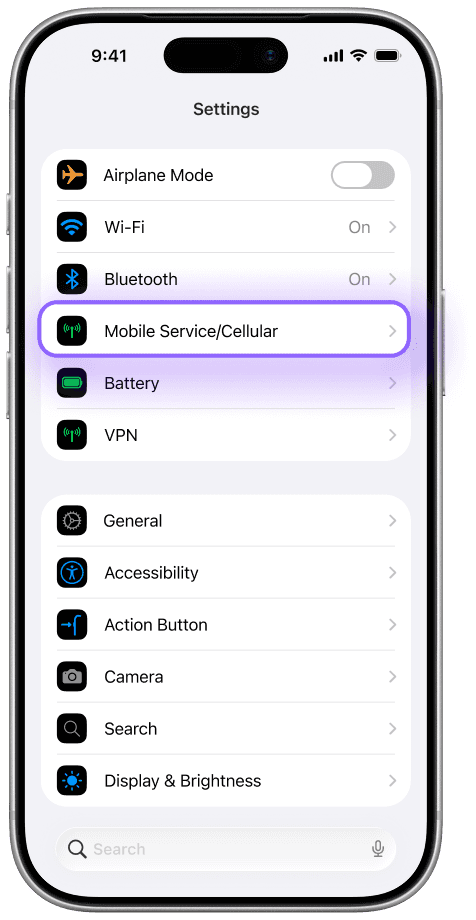
Step 2
Go to Mobile Service
Step 3
Select your Umi eSIM
Step 4
Turn on This Line and Data Roaming
Step 5
Go to Mobile Data
Step 6
Select your Umi eSIM
All Done
You're good to go!
Step 1
Go to Settings
Step 2
Go to Mobile Service
Step 3
Select your Umi eSIM
Step 4
Turn on This Line and Data Roaming
Step 5
Go to Mobile Data
Step 6
Select your Umi eSIM
All Done
You're good to go!
Step 1
Go to Settings
Step 2
Go to Mobile Service
Step 3
Select your Umi eSIM
Step 4
Turn on This Line and Data Roaming
Step 5
Go to Mobile Data
Step 6
Select your Umi eSIM
All Done
You're good to go!
Step 1
Go to Settings
Step 2
Go to Mobile Service
Step 3
Select your Umi eSIM
Step 4
Turn on This Line and Data Roaming
Step 5
Go to Mobile Data
Step 6
Select your Umi eSIM
All Done
You're good to go!
Step 1
Go to Settings
Step 2
Go to Mobile Service
Step 3
Select your Umi eSIM
Step 4
Turn on This Line and Data Roaming
Step 5
Go to Mobile Data
Step 6
Select your Umi eSIM
All Done
You're good to go!
Step 1
Go to Settings
Step 2
Go to Mobile Service
Step 3
Select your Umi eSIM
Step 4
Turn on This Line and Data Roaming
Step 5
Go to Mobile Data
Step 6
Select your Umi eSIM
All Done
You're good to go!
Step 1
Go to Settings
Step 2
Go to Mobile Service
Step 3
Select your Umi eSIM
Step 4
Turn on This Line and Data Roaming
Step 5
Go to Mobile Data
Step 6
Select your Umi eSIM
All Done
You're good to go!
Step 1
Go to Settings
Step 2
Go to Mobile Service
Step 3
Select your Umi eSIM
Step 4
Turn on This Line and Data Roaming
Step 5
Go to Mobile Data
Step 6
Select your Umi eSIM
All Done
You're good to go!
Switch to your Umi eSIM (Easy)
Switch to your Umi eSIM (Easy)
Landing abroad? Turn on your Umi eSIM and set it as your data line — you're connected instantly.
Landing abroad? Turn on your Umi eSIM and set it as your data line — you're connected instantly.
Heading home? Switch back to your primary SIM and turn off the Umi line. It stays installed and ready for your next trip.
Heading home? Switch back to your primary SIM and turn off the Umi line. It stays installed and ready for your next trip.
Get Started
How It Works...(Fast)
How It Works...(Fast)
Just a few simple steps to go global — total data flexibility always at your fingertips.
Just a few simple steps to go global — total data flexibility always at your fingertips.
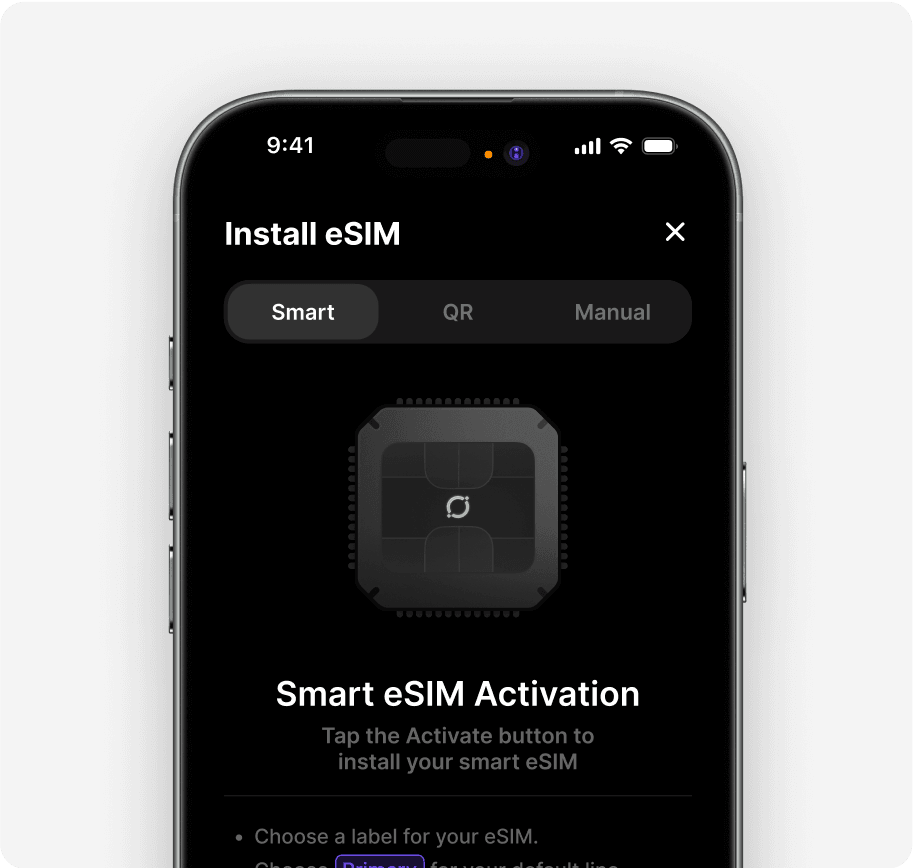
One Umi eSIM for All Your Plans
Install your Universal eSIM with 1 click from the app and use it forever! It works globally in 200+ destinations. Switch it on and off as needed.
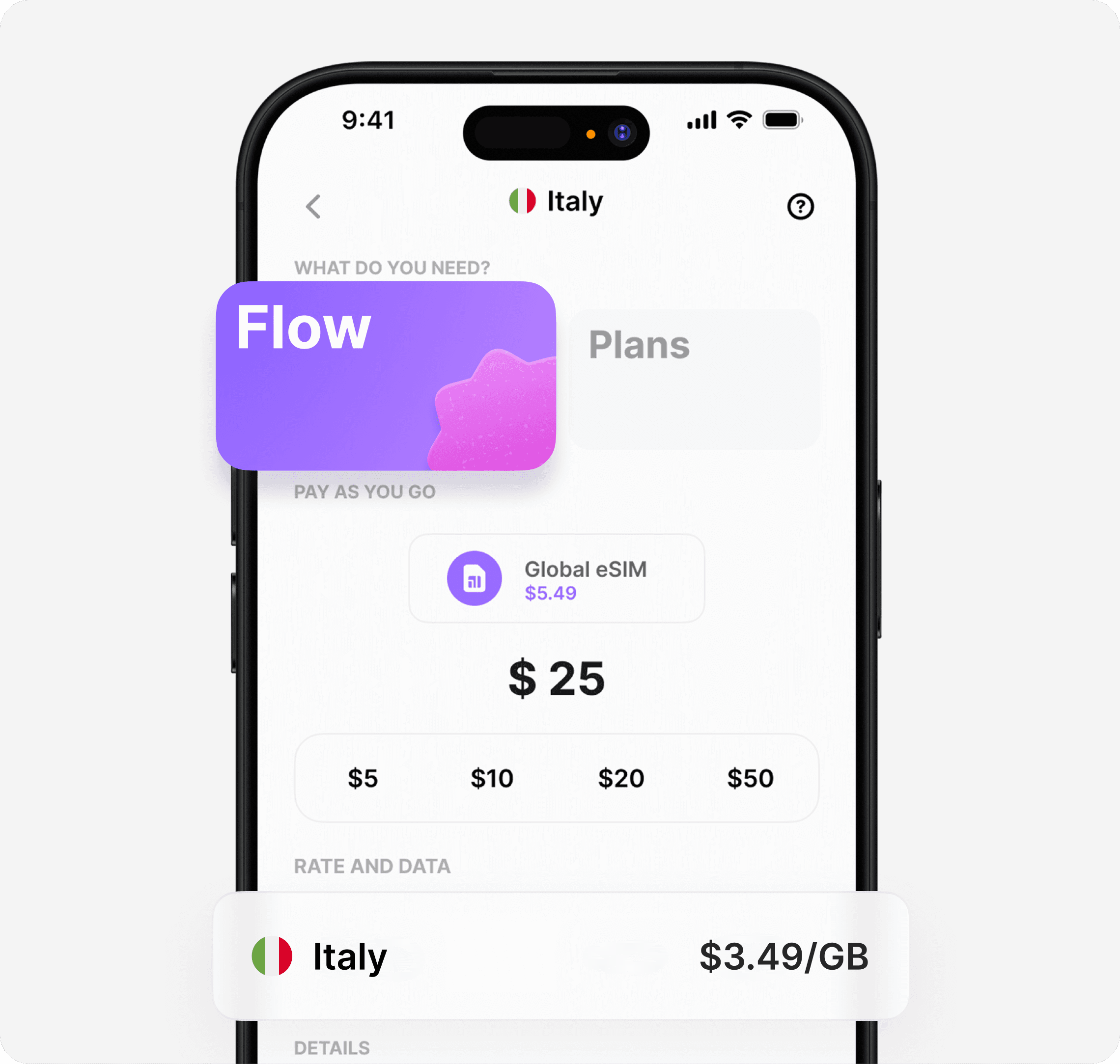
Go With The Flow
Top-up your pay-as-you-go balance; it works everywhere and never expires. Perfect for quick hops, short trips, or uncertain usage — total flexibility without the worry.
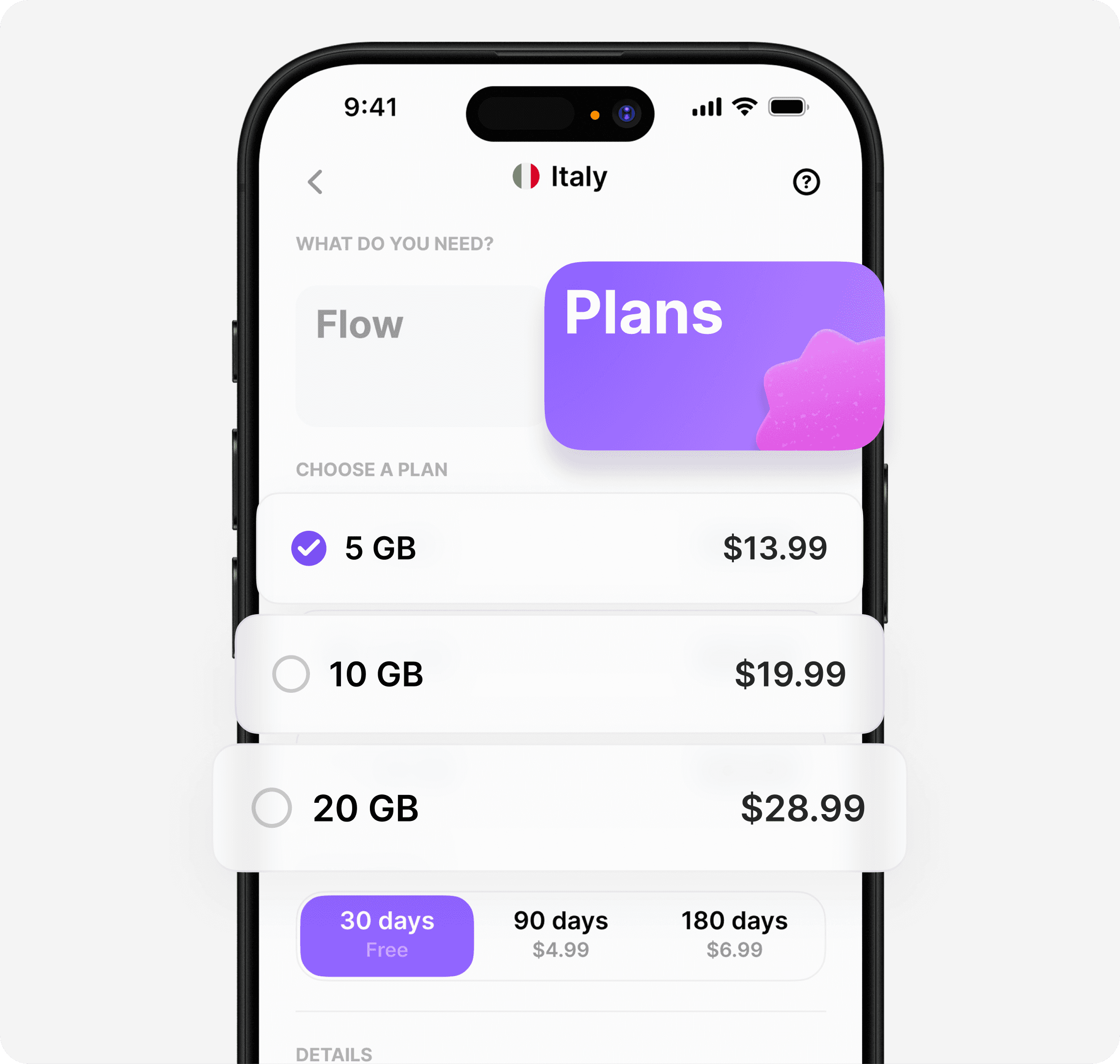
Plan Your Data
Purchase pre-paid plans for more data or longer stays. Single country and regional plans available. Link before use.
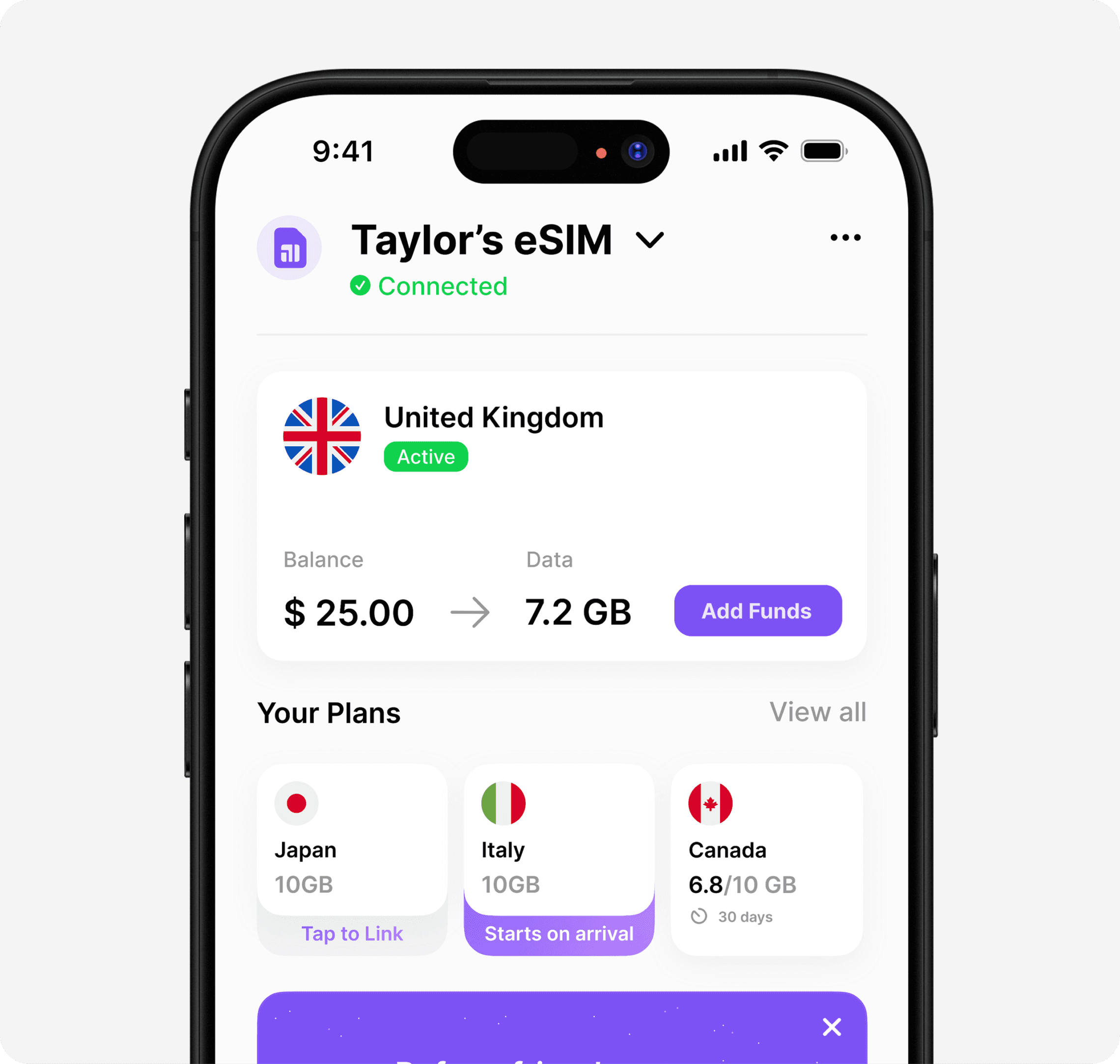
Top Up Anytime
Track your data in the app and add more whenever you need. Plans and Flow always at your fingertips.
Explore
Every destination, covered
One eSIM, 200+ destinations. Buy data plan or pay-as-you-flow.










Explore
Every destination, covered
One eSIM, 200+ destinations. Buy data plan or pay-as-you-flow.
Explore
Every destination, covered
One eSIM, 200+ destinations. Buy data plan or pay-as-you-flow.
Why Umi
Built for travelers, by travelers

Universal eSIM™
One eSIM, 200+ destinations. Install once, use it forever.

Plans & Flow
Pre-paid plans or pay-as-you-go. Your data, your way.

Premium 4G/5G
Top local networks, full speed, never throttled.

Cheaper Than Roaming
Save up to 90% vs carrier roaming fees.
Why Umi
Built for travelers, by travelers
Universal eSIM™
One eSIM, 200+ destinations. Install once, use it forever.
Plans & Flow
Pre-paid plans or pay-as-you-go. Your data, your way.
Premium 4G/5G
Top local networks, full speed, never throttled.
Cheaper Than Roaming
Save up to 90% vs carrier roaming fees.
Why Umi
Built for travelers, by travelers
Universal eSIM™
One eSIM, 200+ destinations. Install once, use it forever.
Plans & Flow
Pre-paid plans or pay-as-you-go. Your data, your way.
Premium 4G/5G
Top local networks, full speed, never throttled.
Cheaper Than Roaming
Save up to 90% vs carrier roaming fees.
FAQ
Got questions? We've got answers
What is Umi?
Umi is a simple, all in one global connection that just works. Install once, use everywhere.
What countries does the eSIM work in?
Umi connects in over 200 destinations, covering almost everywhere except places like North Korea. Use while you travel and as a at home back up.
Can I use Umi alongside my current SIM?
Yes — Umi is designed to work alongside your existing SIM and phone number as long as your phone supports eSIM and is network unlocked.
How much does it cost?
Each country and region has individual rates for Flow (pay-as-you-go) and plans.
Does it come with a phone number?
Currently our eSIMs only provide mobile data. We are working on a solution to provide native numbers and calling + SMS on our eSIM.
Still need help? Contact us in app or
FAQ
Got questions? We've got answers
What is Umi?
Umi is a simple, all in one global connection that just works. Install once, use everywhere.
What countries does the eSIM work in?
Umi connects in over 200 destinations, covering almost everywhere except places like North Korea. Use while you travel and as a at home back up.
Can I use Umi alongside my current SIM?
Yes — Umi is designed to work alongside your existing SIM and phone number as long as your phone supports eSIM and is network unlocked.
How much does it cost?
Each country and region has individual rates for Flow (pay-as-you-go) and plans.
Does it come with a phone number?
Currently our eSIMs only provide mobile data. We are working on a solution to provide native numbers and calling + SMS on our eSIM.
Still need help? Contact us in app or
FAQ
Got questions? We've got answers
What is Umi?
Umi is a simple, all in one global connection that just works. Install once, use everywhere.
What countries does the eSIM work in?
Umi connects in over 200 destinations, covering almost everywhere except places like North Korea. Use while you travel and as a at home back up.
Can I use Umi alongside my current SIM?
Yes — Umi is designed to work alongside your existing SIM and phone number as long as your phone supports eSIM and is network unlocked.
How much does it cost?
Each country and region has individual rates for Flow (pay-as-you-go) and plans.
Does it come with a phone number?
Currently our eSIMs only provide mobile data. We are working on a solution to provide native numbers and calling + SMS on our eSIM.
Still need help? Contact us in app or
Global eSIM, Local Hero.
Work, travel, explore — Umi keeps you connected anywhere. No roaming, no hassle, just smart, seamless internet.
→ Connect globally on 1 eSIM
→ High speed, low latency everywhere
→ Pay-as-you-go balance that never expires
→ Works on unlocked eSIM enabled devices
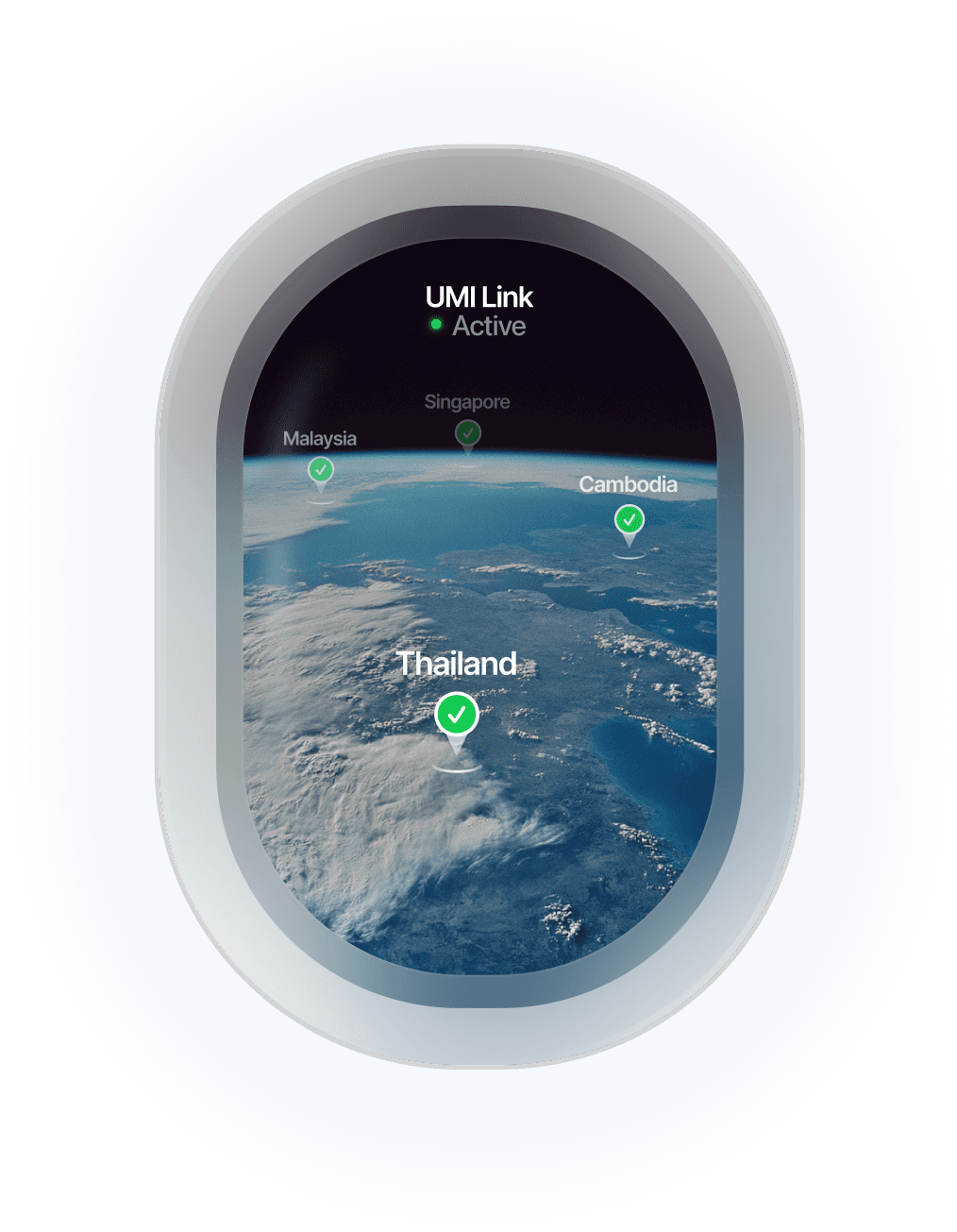
Global eSIM, Local Hero.
Work, travel, explore — Umi keeps you connected anywhere. No roaming, no hassle, just smart, seamless internet.
→ Connect globally on 1 eSIM
→ High speed, low latency everywhere
→ Pay-as-you-go balance that never expires
→ Works on unlocked eSIM enabled devices
Global eSIM, Local Hero.
Work, travel, explore — Umi keeps you connected anywhere. No roaming, no hassle, just smart, seamless internet.
→ Connect globally on 1 eSIM
→ High speed, low latency everywhere
→ Pay-as-you-go balance that never expires
→ Works on unlocked eSIM enabled devices
© 2025 -2026 Umi. All rights reserved.
© 2025 -2026 Umi. All rights reserved.
© 2025 -2026 Umi. All rights reserved.